
Английский язык 7 класс учебник Баранова, Дули ответы – страница 104

- Тип: ГДЗ, Решебник.
- Авторы: Баранова К. М., Дули Д., Копылова В. В. и др.
- Часть: без частей
- Год: 2026.
- Серия: Звёздный английский.
- Издательство: Просвещение.

Module 6е — Модуль 6е
CRIME AND TECHNOLOGY — ПРЕСТУПНОСТЬ И ТЕХНОЛОГИИ
Vocabulary — Словарный запас
Упражнение 1.
In a minute list some positive and negative aspects of using the Internet. Compare your list with your partner’s — За минуту перечисли положительные и отрицательные стороны использования Интернета. Сравни свой список со списком партнера.
PROS: have immediate access to information — ПЛЮСЫ: иметь немедленный доступ к информации
CONS: exposes users to security risks — МИНУСЫ: подвергает пользователей рискам безопасности
PROS: instant communication; convenience in daily routine; accessible education. — мгновенная связь; удобство в повседневной жизни; доступное образование.
CONS: Misinformation; addiction; cybercrime. — дезинформация; зависимость; киберпреступность.
Упражнение 2.
Read the dictionary entry and the following list. How are these words related to it? Check in your dictionaries. — Прочитай словарную статью и следующий список. Как эти слова связаны с ней? Проверь в словарях.
cybercrime / ’salb’kralm / (n) illegal activity committed on the Internet — киберпреступность (сущ.) незаконная деятельность, совершаемая в интернете
• hacking — взлом
• identity theft — кража личных данных
• illegal downloading of music / films, etc — незаконная загрузка музыки / фильмов и т. д.
• online credit card fraud — мошенничество с кредитными картами в Интернете
• phishing — фишинг
• spreading computer viruses — распространение компьютерных вирусов
All these activities are types of cybercrime. — все эти действия являются видами киберпреступлений.
LISTENING — АУДИРОВАНИЕ
Упражнение 3.
Listen to four people who have been victims of cybercrime. Match the people to the crime. — Послушай рассказы четырех человек, ставших жертвами киберпреступлений. Сопоставь этих людей с конкретным преступлением.
A phishing — фишинг
B identity theft — кража личных данных
C computer virus — компьютерный вирус
D illegal downloading — незаконная загрузка
E email spam — спам в электронной почте
• Speaker 1 — Говорящий 1
• Speaker 2 — Говорящий 2
• Speaker 3 — Говорящий 3
• Speaker 4 — Говорящий 4
• Speaker 5 — Говорящий 5
• Speaker 1 — C
• Speaker 2 — D
• Speaker 3 — A
• Speaker 4 — B
STUDY SKILLS — НАВЫКИ ИЗУЧЕНИЯ
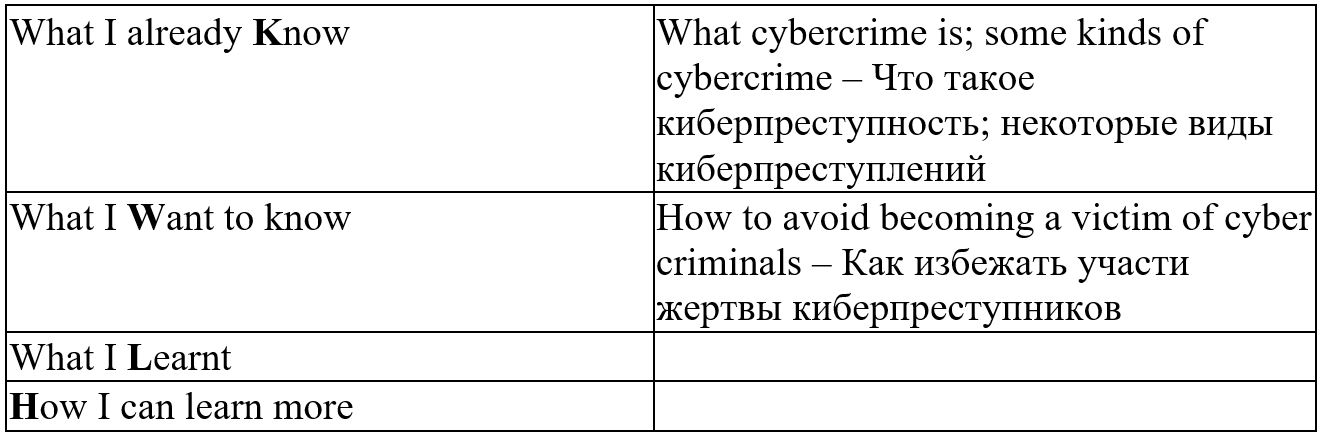
KWLH
Before reading a text, make a KWLH (know-want to know-learn-how) chart. This will help you use your prior knowledge, understand the text better and increase your knowledge. — Перед чтением текста составьте таблицу KWLH (знаю-хочу знать-узнать-как). Это поможет вам использовать имеющиеся знания, лучше понять текст и расширить свои знания.
READING — ЧТЕНИЕ
Упражнение 4.
Copy the chart below into your notebooks. Read the title of the text and complete the first two rows of the chart. — Перепиши приведенную ниже таблицу в тетрадь. Прочитай заголовок текста и заполни первые две строки таблицы.

Ответ:
Упражнение 5.
Read the text and match the headings (A–E) to the paragraphs (1–4). There is one extra heading. — Прочитай текст и сопоставь заголовки (A–E) с абзацами (1–4). Есть один лишний заголовок.
A How they hack
B Filter your mail
C Criminal minds
D Start right
E Common mistake
Cybercrime
1
How would you feel if your computer was hijacked and used to send nasty emails to your friends, or if a virus destroyed all your data? Well, this happens more often than you might think. In fact, in the UK alone hundreds of thousands of private computers are hacked every year. The people behind these attacks are called «crackers» or «hackers». Hackers are highly intelligent programmers who can easily break into computer systems. They use their expert knowledge and skills to gain access and can then steal data or infect computers with a virus or a worm. If you want to surf safely and protect your computer you need to protect yourself against these cybercrimes.
2
When creating an email account you should choose a good username for your email address. Don’t use your own name and don’t include anything in your username that could indicate your age or home address. Avoid usernames like cool13yrs or nicegirl. Instead use a word from the dictionary that appeals to you or a secret code that only means something to you. Choose a smart and difficult to guess password consisting of a combination of letters and numbers. Your date of birth or the name of your pet would be very bad choices. Finally, don’t share your password with anyone and change it regularly.
3
Most people actually have their email account hacked due to their own fault. Allowing your computer to remember your password is one mistake that could cost a lot. Don’t put yourself at risk. You should always set your account so that you have to type in your password each time and always log out properly so that if someone uses or steals your computer they can’t access your email.
4
Some email providers give you the option of being listed in an online directory so they can contact you with offers. Don’t list your email unless you want to receive lots of spam mail. Don’t open any emails from people you don’t know but delete them instead. Likewise, don’t open any attachments unless they were run through an anti-virus program and never reply to spam or any offensive or harassing messages. Finally, keep your software updated and run anti-virus scans regularly. It’s one of the best ways to protect your computer and stay safe.
Check these words — Проверь эти слова:
hijack, virus, expert, infect, worm, account, username, password, provider, directory, spam — похитить, вирус, эксперт, заражение, червь, учетная запись, имя пользователя, пароль, провайдер, каталог, спам.
Ответ:
Cybercrime — Киберпреступность
1 — C. Criminal minds — Преступные умы
How would you feel if your computer was hijacked and used to send nasty emails to your friends, or if a virus destroyed all your data? Well, this happens more often than you might think. In fact, in the UK alone hundreds of thousands of private computers are hacked every year. The people behind these attacks are called «crackers» or «hackers». Hackers are highly intelligent programmers who can easily break into computer systems. They use their expert knowledge and skills to gain access and can then steal data or infect computers with a virus or a worm. If you want to surf safely and protect your computer you need to protect yourself against these cybercrimes. — Как бы вы себя чувствовали, если бы ваш компьютер был взломан и использован для рассылки неприятных писем друзьям, или если бы вирус уничтожил все ваши данные? Это случается чаще, чем вы думаете. Фактически, только в Великобритании ежегодно взламываются сотни тысяч частных компьютеров. Людей, стоящих за этими атаками, называют «взломщиками» или «хакерами». Хакеры — это высококвалифицированные программисты, которые легко взламывают компьютерные системы. Они используют свои экспертные знания и навыки для получения доступа, а затем могут украсть данные или заразить компьютеры вирусом или червем. Если вы хотите безопасно пользоваться интернетом и защитить свой компьютер, вам необходимо защитить себя от этих киберпреступлений.
2 — D. Start right — Правильное начало
When creating an email account you should choose a good username for your email address. Don’t use your own name and don’t include anything in your username that could indicate your age or home address. Avoid usernames like cool13yrs or nicegirl. Instead use a word from the dictionary that appeals to you or a secret code that only means something to you. Choose a smart and difficult to guess password consisting of a combination of letters and numbers. Your date of birth or the name of your pet would be very bad choices. Finally, don’t share your password with anyone and change it regularly. — При создании учетной записи электронной почты выберите подходящее имя пользователя. Не используйте свое собственное имя и не включайте в него ничего, что могло бы указывать на ваш возраст или домашний адрес. Избегайте имен пользователей типа cool13yrs или nicegirl. Вместо этого используйте слово из словаря, которое вам нравится, или секретный код, который что-то значит только для вас. Выберите умный и трудноугадываемый пароль, состоящий из комбинации букв и цифр. Ваша дата рождения или имя вашего питомца будут очень плохим выбором. Наконец, не сообщайте свой пароль никому и регулярно меняйте его.
3 — E. Common mistake — Распространенная ошибка
Most people actually have their email account hacked due to their own fault. Allowing your computer to remember your password is one mistake that could cost a lot. Don’t put yourself at risk. You should always set your account so that you have to type in your password each time and always log out properly so that if someone uses or steals your computer they can’t access your email. — У большинства людей взламывают электронные почтовые ящики по их собственной вине. Разрешение компьютеру запоминать ваш пароль — это одна из ошибок, которая может дорого обойтись. Не подвергайте себя риску. Всегда настраивайте свою учетную запись так, чтобы вам приходилось каждый раз вводить пароль, и всегда правильно выходите из системы, чтобы в случае, если кто-то воспользуется вашим компьютером или украдет его, он не смог получить доступ к вашей электронной почте.
4 — B. Filter your mail — Фильтруйте почту
Some email providers give you the option of being listed in an online directory so they can contact you with offers. Don’t list your email unless you want to receive lots of spam mail. Don’t open any emails from people you don’t know but delete them instead. Likewise, don’t open any attachments unless they were run through an anti-virus program and never reply to spam or any offensive or harassing messages. Finally, keep your software updated and run anti-virus scans regularly. It’s one of the best ways to protect your computer and stay safe.Some email providers give you the option of being listed in an online directory so they can contact you with offers. Don’t list your email unless you want to receive lots of spam mail. Don’t open any emails from people you don’t know but delete them instead. Likewise, don’t open any attachments unless they were run through an anti-virus program and never reply to spam or any offensive or harassing messages. Finally, keep your software updated and run anti-virus scans regularly. It’s one of the best ways to protect your computer and stay safe. — Некоторые почтовые сервисы предоставляют возможность размещения информации о вас в онлайн-каталоге, чтобы они могли связываться с вами с предложениями. Не указывайте свой адрес электронной почты, если не хотите получать много спама. Не открывайте письма от незнакомых людей, а удаляйте их. Аналогично, не открывайте вложения, если они не были проверены антивирусной программой, и никогда не отвечайте на спам или любые оскорбительные или преследующие сообщения. Наконец, регулярно обновляйте программное обеспечение и запускайте антивирусные проверки. Это один из лучших способов защитить свой компьютер и оставаться в безопасности.
Heading A. How they hack is extra. — Заголовок А. Способ взлома — лишний.
С подпиской рекламы не будет
Подключите премиум подписку со скидкой в 40% за 149 ₽






Напишите свой комментарий.